 Lupita
 Recipe Apps
7 Best Recipe Apps for iPhone in 2026 (Tested)
Most recipe apps were built for a world where recipes came from cookbooks and food blogs. In 2026, most people find new recipes on TikTok, Instagram Reels, and YouTube Shorts — and then lose them the moment they close the app.
We tested seven of the most popular recipe apps for iPhone, focusing on how each one actually handles the way people cook today: saving recipes from video, converting US cups and tablespoons to grams, working offline, and staying out of the way while you cook. Here is what we found.
- Best for TikTok, Instagram & YouTube recipes: Lupita — the only app that imports directly from video
- Best for serious home cooks with a big recipe collection: Paprika 3 — one-time $4.99, fully offline, excellent organizer
- Best free app for recipe discovery: Yummly — largest database, smart recommendations
- Best free web clipper: Whisk — saves any recipe website cleanly, great shopping list
- Best for meal planning: Mealime — weekly planner with automatic grocery list
How we tested
Each app was installed on a test iPhone 15 running iOS 18. We evaluated every app on five criteria:
- Import method (35%). Can it save recipes from TikTok, Instagram, and YouTube? From recipe websites? Manual entry only? We tested each import method with real recipes.
- Measurement handling (25%). Does the app convert cups, tablespoons, and ounces to grams? Does it scale ingredients when you change serving count?
- Offline access (20%). Are saved recipes readable without an internet connection? What happens if a source video or website is deleted?
- In-cooking experience (10%). Does the screen stay on? Is the text large enough? Can you check off ingredients or steps?
- Price and value (10%). Free tier limits, subscription cost, one-time purchase option.
November 2026 update: prices and ratings rechecked against live US App Store listings.
Quick comparison table
| App | Video import | Grams conversion | Offline | Price |
|---|---|---|---|---|
| Lupita | TikTok, Instagram, YouTube, Pinterest | Auto (ingredient-specific) | Yes, fully | Free (5 imports); $2.99/mo |
| Paprika 3 | No | Manual only | Yes, fully | $4.99 one-time |
| Yummly | No | No | Partial (cached only) | Free; $4.99/mo Pro |
| Whisk | No | Partial | No | Free |
| BigOven | No | No | Partial | Free; $2.99/mo Pro |
| Mealime | No | No | No | Free; $5.99/mo Pro |
| Cookpad | No | No | No | Free; $2.99/mo Premium |
Lupita — Best for Recipes from TikTok, Instagram, and YouTube
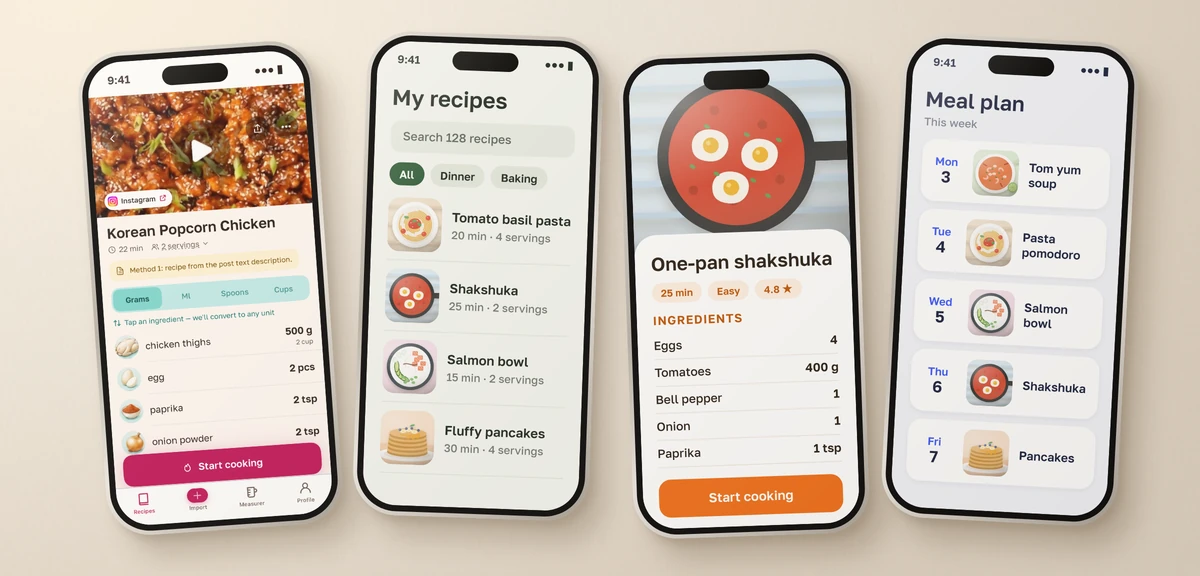
Lupita is the only recipe app in this roundup that imports directly from video. Copy a TikTok link, paste it in Lupita, tap Import — you get a structured recipe card with ingredients, quantities, and steps in under a minute. The same workflow works for Instagram Reels, YouTube, YouTube Shorts, and Pinterest.
Under the hood, Lupita transcribes the video audio, reads any text overlays and the description, then passes everything through an AI extraction layer. Quantities come out as numbers rather than fractions, and every US volume measurement is automatically converted to grams using ingredient-specific density values. A cup of flour becomes 120 g. A tablespoon of butter becomes 14 g. You do not need to think about it.
Once saved, recipes live on your device and work completely offline — including if the original TikTok or YouTube video is later deleted. The serving scaler adjusts every ingredient quantity proportionally when you change the number of servings.
The free tier gives you 5 imports to start. After that, the Mini plan at $2.99/month includes 15 imports per month, which covers weekly cooking comfortably. The built-in measurement converter (grams, cups, tablespoons, teaspoons, ounces) is free forever.
Pros
- Only app that imports from TikTok, Instagram, YouTube, Pinterest
- Automatic conversion from cups to grams
- Fully offline after import
- Serving scaler adjusts every ingredient
- Free measurement converter
Cons
- Monthly import limit on paid plans
- No built-in recipe discovery or database
- Newer app, smaller user review base
- iOS only
Paprika 3 — Best for Power Users With a Large Recipe Collection
Paprika 3 is the most mature recipe organizer in this roundup. It has been on the App Store since 2010 and has built up a large, loyal following among serious home cooks. The one-time $4.99 price — with no subscription — is still one of the best deals in the App Store for the feature set you get.
The core workflow is a built-in browser: navigate to any recipe website, tap the Paprika icon, and the app extracts the recipe automatically. The extraction quality is reliable on major recipe sites (Serious Eats, NYT Cooking, Food52, Allrecipes) and decent on food blogs. What you get is the recipe in your library, offline forever.
Organization is Paprika's strongest suit. You can add any custom tag, put recipes into categories, create meal plans, build grocery lists, and track your pantry inventory. The meal planner syncs across iPhone, iPad, and Mac (separate one-time purchase per platform). Measurements stay in whatever units the original recipe used — Paprika does not convert cups to grams.
Pros
- $4.99 one-time — no subscription
- Best-in-class recipe organization and tagging
- Excellent web clipper for recipe websites
- Meal planner and grocery list built in
- Fully offline after import
- Mac and iPad versions available
Cons
- No video import (TikTok, Instagram, YouTube)
- No measurement conversion to grams
- Web clipper misses some complex blog layouts
- UI design shows its age in places
Yummly — Best for Recipe Discovery and Inspiration
Yummly's core strength is its database. Over two million recipes from thousands of food publishers, filtered by dietary restriction, cuisine, cook time, ingredient, and skill level. The personalized feed surfaces recipes based on what you cook and save, and it gets smarter over time. If you mostly want inspiration — a new weeknight dinner, a weekend project, a dessert for an occasion — Yummly's recommendation engine is the best in this roundup.
The Guided Cooking mode walks you through recipes step by step with voice control. The Pro tier adds a nutrition breakdown and integration with smart ovens from Whirlpool and KitchenAid. The grocery list is functional. What Yummly lacks is flexibility: you cannot import from a video, and saved recipes are not reliably accessible offline. If the app loses connection mid-recipe, you may lose your place.
Pros
- Largest recipe database of any app here (2M+)
- Strong personalized recommendation engine
- Voice-guided step-by-step cooking mode
- Smart appliance integration (Whirlpool)
- Generous free tier
Cons
- No video import
- No grams conversion
- Unreliable offline access
- Pro subscription needed for nutrition data
Whisk — Best Free Web Clipper With a Smart Shopping List
Whisk is entirely free and does one thing exceptionally well: saving recipes from websites. The Share Sheet extension lets you save a recipe from Safari, Chrome, or any browser in two taps. The extraction quality is consistent, and the shopping list is the best of any app in this roundup — it automatically combines duplicate ingredients across multiple recipes and sorts by store section.
The measurement conversion is partial: Whisk can convert between metric and imperial on demand, but it does not automatically convert on import. Offline access does not exist — Whisk requires an internet connection to view recipes. The app is cloud-only, which means if Whisk the company closes, your saved recipes are gone.
Pros
- Completely free, no subscription
- Best shopping list of any app here
- Easy Share Sheet clipping from any browser
- Clean, minimal interface
Cons
- No video import
- No offline access
- Cloud-only storage
- Partial measurement conversion only
BigOven — Best Community Recipe Library
BigOven has been running since 2003 and has accumulated over a million user-submitted recipes. The community angle is its strongest differentiator: recipes come with real reviews from home cooks rather than professional food editors, and the "use up leftovers" search (enter ingredients you have, get recipes that use them) is genuinely useful on weeknights.
The free tier limits you to 10 saved recipes per month, which is tight for regular cooks. The Pro plan at $2.99/month removes that limit and adds meal planning and a grocery list. Measurement conversion is not available, and offline access is inconsistent.
Pros
- "Use up leftovers" ingredient search is unique
- Large community recipe database (1M+)
- Real home cook reviews
- Affordable Pro tier at $2.99/mo
Cons
- 10 saves/month limit on free tier
- No video import
- No grams conversion
- UI feels dated compared to newer apps
Mealime — Best for Weekly Meal Planning
Mealime is built specifically for weekly meal planning. Choose your dietary preferences, pick how many servings you need, and the app builds a weekly meal plan and a consolidated grocery list automatically. The recipe library is curated rather than community-driven — every recipe is tested and written to the same format, which makes the cooking experience more consistent than community apps.
The free tier covers basic meal planning with a limited recipe library. Pro unlocks the full library, custom servings, and nutrition tracking. Mealime does not convert measurements to grams and does not import from video or external websites — all recipes come from within the Mealime library.
Pros
- Best automated weekly meal planner
- Automatic consolidated grocery list
- Curated, consistently formatted recipes
- Strong dietary filter options
Cons
- Closed ecosystem — can only use Mealime recipes
- No video import or web clipper
- No grams conversion
- No offline access
- Most expensive Pro tier in this roundup
Cookpad — Best for Home Cook Community Recipes
Cookpad is the world's largest community cooking platform, with over five million recipes across 70 countries. The social angle is stronger than any other app here — recipes have comments, cooking diary entries from other cooks, and a culture of sharing adaptations. If you want recipes that feel genuinely homemade rather than food-publication-polished, Cookpad's community is where they live.
The app is primarily a discovery and community platform rather than a recipe organizer. You can save recipes to collections, but the experience of managing a large library is less capable than Paprika or even Whisk. No video import, no grams conversion, no offline access.
Pros
- Largest global recipe community (5M+)
- Strong social features (comments, cooking diaries)
- Good international recipe diversity
- Free to browse and save
Cons
- No video import
- No grams conversion
- No offline access
- Recipe quality is inconsistent (community-submitted)
The bottom line
Six of the seven apps in this roundup have no answer for recipes found on TikTok, Instagram Reels, or YouTube Shorts. They were built for a recipe ecosystem that no longer describes how most people discover food.
The right combination depends on where your recipes come from:
- If you find recipes on social media → Lupita is the only app. Nothing else imports from video.
- If you cook from recipe websites and want a permanent library → Paprika 3 at $4.99 one-time is the best value in the category.
- If you want to discover new recipes → Yummly for the recommendation engine, Cookpad for the community feel.
- If you need meal planning → Mealime if you want structure; Paprika if you want to use your own recipes.
- If you want free and good enough → Whisk for website recipes and shopping list; Yummly for discovery.
Most serious home cooks end up using two apps: one for import/organization (Lupita or Paprika) and one for discovery (Yummly or Cookpad). That combination covers both where recipes start and where they live.
Frequently asked questions
- What is the best recipe app for iPhone in 2026?
- For saving recipes from social media videos, Lupita is the only option — it imports directly from TikTok, Instagram Reels, YouTube, and Pinterest. For managing a large existing recipe collection, Paprika 3 offers the best combination of features and value at $4.99 one-time. For recipe discovery and inspiration, Yummly has the largest database.
- Is there a free recipe app for iPhone?
- Yes. Yummly, Whisk, Mealime (basic), and Cookpad are free. Lupita gives 5 free imports plus a free measurement converter. Paprika 3 is a one-time $4.99 with no subscription. BigOven is free for up to 10 saves per month.
- What recipe app works without internet?
- Paprika 3 and Lupita both store recipes fully offline on your device. Once a recipe is imported in Lupita, it works with no internet connection — even if the original TikTok or YouTube video is later deleted. Yummly, Whisk, Mealime, and Cookpad require an internet connection to view recipes.
- Can I import a recipe from TikTok to iPhone?
- Yes. Lupita is the only recipe app that imports recipes directly from TikTok videos. Copy the TikTok link, paste it in Lupita, and get a structured recipe card with ingredients in grams in under a minute. See the full guide: how to import a recipe from TikTok.
- Which recipe app converts measurements to grams?
- Lupita automatically converts cups, tablespoons, and teaspoons to grams on import using ingredient-specific density values — 1 cup of flour becomes 120 g, 1 cup of sugar becomes 200 g. None of the other apps in this roundup convert automatically on import. See the full reference: grams to cups converter.
- What is the best meal planning app for iPhone?
- Mealime is the most focused meal planning app in this roundup, with a weekly planner and automatic grocery list. Paprika 3 also has a strong meal planner for cooks who manage their own recipe library from multiple sources.
- Does any recipe app work with Instagram Reels?
- Lupita imports recipes from Instagram Reels. Copy the Reel link, paste it in Lupita, and the app extracts the recipe. See the full guide: how to save a recipe from Instagram.
- What recipe app does not require a subscription?
- Paprika 3 is $4.99 once with no subscription and no recurring charges. Whisk, Yummly, and Cookpad are free. Lupita offers a free tier with 5 imports; paid plans are monthly subscriptions starting at $2.99.
Sources
- Yummly — App Store listing — ratings and pricing verified November 2026
- Paprika 3 — App Store listing — one-time price verified November 2026
- Whisk — App Store listing — pricing verified November 2026
- Schema.org Recipe specification — structured data format used to evaluate import accuracy