iPhone App Tips
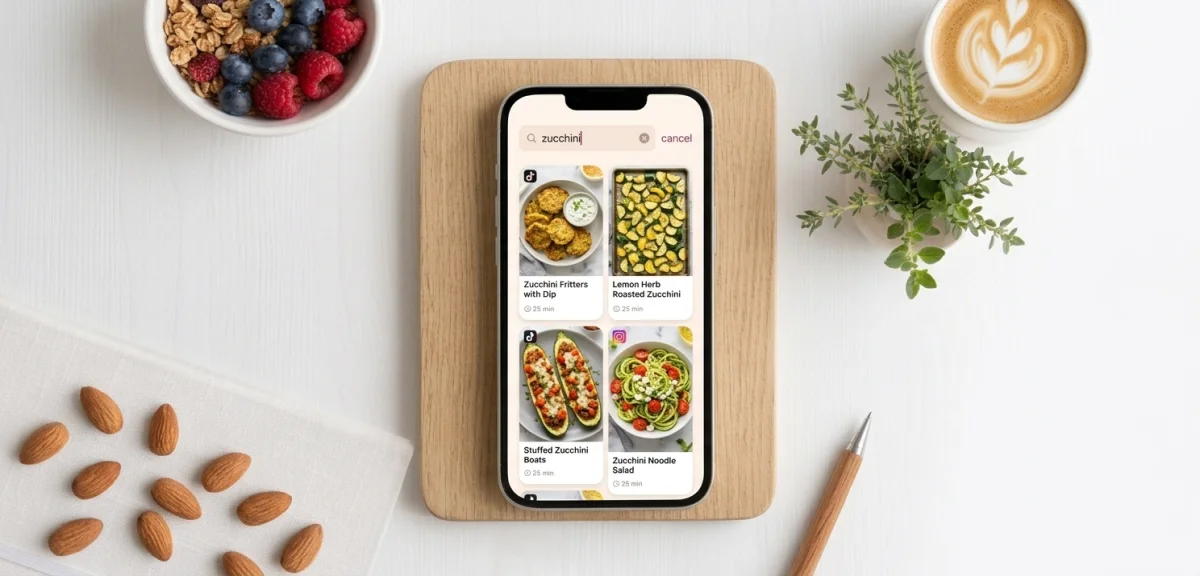
There are two fundamentally different ways to search for recipes by what's in your fridge, and they solve very different problems.
Approach A: Search a generic database. Apps like SuperCook, Cooklist, and Yummly let you enter ingredients from your pantry and pull matching recipes from the internet. The results come from thousands of food sites — AllRecipes, Food Network, random blogs. You'll get a lot of options, but they're generic: not from creators you follow, not in your preferred style, and not measured in grams unless the original source used them. You also have to save the recipe somewhere separately if you want to come back to it later.
Approach B: Search your own imported collection. This is what Lupita does. Every time you import a recipe from TikTok, Instagram, YouTube, or Pinterest, Lupita saves the full recipe card locally — ingredients with gram weights, numbered steps, thumbnail. When you search by ingredient, Lupita filters only the recipes you personally chose and saved. The results are from creators you already trust, in a format you've already cooked from.
If you spend 20 minutes a week saving recipes from social media, Approach B is significantly more useful after the first month. By the time you have 30+ saved recipes, typing "chicken" in Lupita shows you a curated shortlist — not 400 internet results you'd have to scroll through.
Open TikTok, Instagram, YouTube, or Pinterest. Find a recipe you'd actually cook. Copy the link. Open Lupita, paste it. The app extracts the full recipe — ingredients in grams, steps, thumbnail — in under a minute. Repeat until you have 10+ saved. That's the minimum for search to feel useful.
Open Lupita. At the top of your recipe collection you'll see a search bar. Tap it.
Type the name of whatever ingredient you have — "chicken", "zucchini", "feta", "salmon". Lupita searches the ingredient lists of all your saved recipes in real time and filters to show only the ones that contain it.
The list updates as you type. Each result shows the recipe name and the platform it came from (TikTok, Instagram, YouTube). Tap any recipe to open the full card.
The full card has all ingredients with gram measurements, numbered steps, and a thumbnail. Tap the cooking screen for a full-screen view that keeps the display on while you cook.
SuperCook and Cooklist are built around the idea of "you tell us what's in your pantry, we find matching internet recipes." That works well for discovery — if you've never cooked with a particular ingredient before, you'll get lots of ideas. But the workflow is different from Lupita's.
| Feature | Lupita | SuperCook | Cooklist |
|---|---|---|---|
| Searches your personal saved collection | ✓ | ✗ | ✗ |
| Works offline | ✓ | ✗ | ✗ |
| Imports from TikTok / Instagram | ✓ | ✗ | ✗ |
| Ingredients displayed in grams | ✓ | Depends on source | Depends on source |
| Results from creators you follow | ✓ | ✗ | ✗ |
SuperCook's main use case is "I have no idea what to cook tonight and want inspiration from across the internet." Lupita's main use case is "I've been saving recipes all week and now I want to find which of my saved recipes use the chicken that needs to be cooked today." Different problems, different tools — but if most of your recipes come from social media videos, Lupita's approach wins for day-to-day cooking.
Some ingredients appear across recipe types more than others. The ones worth searching are the ones you buy regularly and have sitting in your fridge or pantry. Here are the categories that come up most often in imported recipe collections:
The "fridge cleanout" approach works well with Lupita: before you go grocery shopping, open the app and type whatever's been sitting in your fridge longest. If you have half a block of feta and some cherry tomatoes, search "feta" first to see which of your saved recipes use it, then plan your week around using it up.
One thing to keep in mind: Lupita searches the actual text of the ingredient list as it was extracted from the video. If a recipe says "1 chicken breast" and you search "chicken", it will match. But if you search "breast" only, it will also match — the search looks for any substring. So shorter search terms tend to return more results.
The ingredient search gets genuinely useful somewhere around 20–30 saved recipes. Below that, you might search "chicken" and get 2 results — not enough to feel like a real filter. Here's a practical way to build up quickly:
Pick three platforms and import 5 recipes from each in a single session. Spend 15 minutes on TikTok saving 5 recipes you'd actually cook. Then 5 from Instagram. Then 5 from YouTube. That's 15 recipes imported in one sitting, and your first search by ingredient will already return 3–4 results for common proteins.
After you've cooked a recipe, don't delete it from Lupita — keep it. Over time, your collection reflects your actual taste rather than a generic database. When you search "salmon" six months from now, every result is something you personally chose because it looked good to you on that day.
Using Lupita's collections feature also helps: create a collection called "Quick weeknight" for 30-minute recipes, or "Chicken" for everything with chicken. Collections and ingredient search work independently — you can search within the full collection or browse by tag, depending on what you need in the moment.
 Lupita